
| 일 | 월 | 화 | 수 | 목 | 금 | 토 |
|---|---|---|---|---|---|---|
| 1 | 2 | |||||
| 3 | 4 | 5 | 6 | 7 | 8 | 9 |
| 10 | 11 | 12 | 13 | 14 | 15 | 16 |
| 17 | 18 | 19 | 20 | 21 | 22 | 23 |
| 24 | 25 | 26 | 27 | 28 | 29 | 30 |
| 31 |
- 개발자취업부트캠프
- MVC 패턴
- View
- github
- 클래스 상속
- #패스트캠퍼스 #국비지원교육 #메가바이트스쿨 #MegabyteSchool #개발자취업부트캠프 #내일배움카드
- #javaStudy
- AWS
- 패스트캠퍼스
- group study
- Interface
- GIT
- Entity
- array
- 내일배움카드
- Spring
- MegabyteSchool
- side project
- 클래스 class
- 게시판 리뷰 만들기
- Sts
- 국비지원교육
- spring boot
- tomcat
- Algorism study
- MVC
- 게시판 만들기
- 메가바이트스쿨
- crud
- Java
- Today
- Total
tuter77
게시판 만들기(8) - update 구현 본문
● 그룹스터디 게시판 웹 구현
▷ CRUD 중 U
저번주에 진행하던 DB에서 데이터를 받아와 웹 브라우저에 띄워주는 작업을 마무리했다.
조회, 새 글 저장, 기존 글 삭제 는 구현했지만 왜인지 수정기능이 작동하지 않았었는데 알고보니 어노테이션을 잘못 붙였었다.PostMappting으로 해야 정보를 새로 저장하는 것이 가능한데 데이터를 가져오기만 하는 겟매핑 어노테이션으로 시도하고 있었던것....(멍청한 나.. 오탈자와 기본기에서 너무 모자라다.)정상작동하게 된 코드는 아래와같다.
먼저 상세페이지.

이 브라우저에서 해당 이름을 클릭하면 상세정보를 볼 수 있는 상세페이지로 넘어가는데 상세페이지는 아래와 같이 구현했던걸, 저번주에 공부했다.
그 중 수정페이지로 넘어가는 버튼을 상세페이지 안에 구현했다.
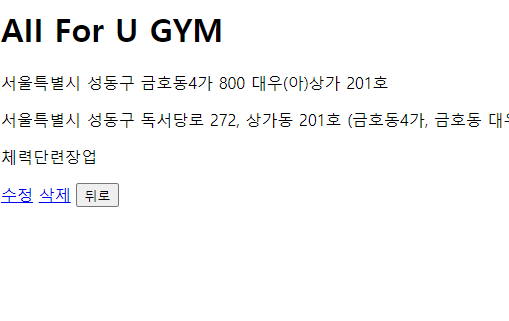
이 수정버튼을 누르면 수정할 수 있는 html페이지로 넘어가게 된다.
<!DOCTYPE html>
<html xmlns:th="http://www.thymeleaf.org">
<html lang="en">

<head>
    <meta charset="UTF-8">
    <title>상세페이지</title>
</head>

<body>
    <h1 th:text="${healthInfo.brand_name}"></h1>
    <p th:text="${healthInfo.land_number}"></p>
    <p th:text="${healthInfo.road_number}"></p>
    <p th:text="${healthInfo.category}"></p>
    <a th:href="@{/home/modified/{id}(id=${healthInfo.id})}">수정</a>
    <a th:href="@{/home/delete(id=${healthInfo.id})}">삭제</a>
    <button type="submit" onclick="location.href='/home'">뒤로</button>
</body>
</html>
여기서 a태그를 사용해 링크를 걸었고, 해당 링크는 id값을 통해 수정페이지에 데이터를 불러온다.
수정 페이지는 아래와 같다.

이 페이지는 아래 html로 구현했고, 요청은 컨트롤러에서 처리된다.
<!DOCTYPE html>
<html xmlns:th="http://www.thymeleaf.org">
<html lang="en">

<head>
    <meta charset="UTF-8">
    <title>상세페이지</title>
</head>

<body>
    <form th:action="@{/home/modified/update/{id}(id=${healthInfo.id})}" method="post">
        <input name="brand_name" type ="text" th:value="${healthInfo.brand_name}">
        <input name="land_number" type ="text" th:value="${healthInfo.land_number}">
        <input name="road_number" type ="text" th:value="${healthInfo.road_number}">
        <input name="category" type ="text" th:value="${healthInfo.category}">
        <button type="submit">수정</button>
        <a th:href="@{/home}">홈으로</a>
    </form>
</body>
</html>
id를 통해 각 값들을 th:value라는 키워드로 조회해서 가져온다.
그리고 수정버튼을 누르면 수정기능이 수행되고 '홈으로' 버튼을 누르면 메인페이지로 돌아가게 된다.
형태 자체는 writer.html 과 같지만, id를 통해 안에 값들을 불러서 보여준다는 점이 다르다.
상세페이지에서 수정버튼을 눌러 modified.html 페이지를 반환해주고 해당 데이터를 가져오는 컨트롤러의 기능은 아래와 같이 구현했다.
    @GetMapping("/home/modified/{id}") //상세 페이지 내 수정
    public String modified(@PathVariable("id") Long id, Model model) {
        model.addAttribute("healthInfo", homeService.healthView(id));
        return "modified";
    }
여기서 @Pathvariable이 또 보이는데 id값을 파라미터로 전달해주는 역할을 한다.
model객체에 전달된 id값은 homeService의 healthView메서드로 데이터를 조회해서 값을 저장하고 이를 modified 페이지에 보여주게된다.
값을 수정해서 새로 저장하여 보여주는 기능은 아래와 같이 구현했다.
    @PostMapping("/home/modified/update/{id}")
    public String modifiedUpdate(@PathVariable("id") Long id, HealthInfo healthInfo) {
        HealthInfo healthInfoTemp = homeService.healthView(id); //id값으로 조회한 데이터 가져옴

        healthInfoTemp.setBrand_name(healthInfo.getBrand_name());
        healthInfoTemp.setLand_number(healthInfo.getLand_number());
        healthInfoTemp.setRoad_number(healthInfo.getRoad_number());
        healthInfoTemp.setCategory(healthInfo.getCategory());

        homeService.write(healthInfo);

        return "redirect:/home";
    }
여기가 문제의 GetMapping 구간이었는데 이를 데이터를 저장할 수 있는 @PostMapping 어노테이션으로 바꾸어주니 정상 작동하게 되었다.
이 modifiedUpdate() 메서드는 패스베리어블로 id값을 동일하게 전달 받고 이를 healthinfo 객체에 저장하여 첫 생성자 구문을 통해 값을 반환하게 된다.
healthInfo의 인스턴스 healthInfoTemp 는 반환된 값들을 갖고있고 해당 인스턴스에서 get/set 메서드를 통해 값들을 수정하게 된다.
해당 값들이 객체에 잘 저장되었으니 db까지 저장시켜주는 코드는 homeService의 write 메서드이다. 이는 앞서 구현한 저장기능과 동일하다.
결과적으로 수정이 잘되면 메인 페이지(home)를 재요청한다.(브라우저에 보여준다)
위 내용은 2023.01.16에 공부한 내용입니다.
'GroupStudy' 카테고리의 다른 글
| 게시판 만들기(10) - Review CRUD 구현 (0) | 2023.01.29 |
|---|---|
| 게시판 만들기(9) - Controller 및 Service 클래스 수정 (0) | 2023.01.29 |
| 게시판 만들기(7) - 저장, 삭제 기능 구현 (0) | 2023.01.29 |
| 게시판 만들기(6) 엔티티 연관관계 설정 및 view구현. (0) | 2023.01.29 |
| 게시판 만들기(5) - review 엔티티 만들기. (0) | 2023.01.29 |
